So try it...use it and
Have fun...
Gurstnibbler is provided "AS IS" without warranty of any kind, and the author is not responsible for any damage this software may do.
Amiga Gurstnibbler for PC
DOS, BAM, DEEP...
Supported Controllers:
Greaseweazle, ADF-Drive, DrawBridge aka Arduino Amiga Floppy Disk Reader/Writer
Update: 01.04.2026
Ver. 0.1
Hello Amiga friends...
A new copy program is ready for testing.
Many...many thanks to Martin Zimmer for his great program on the Amiga
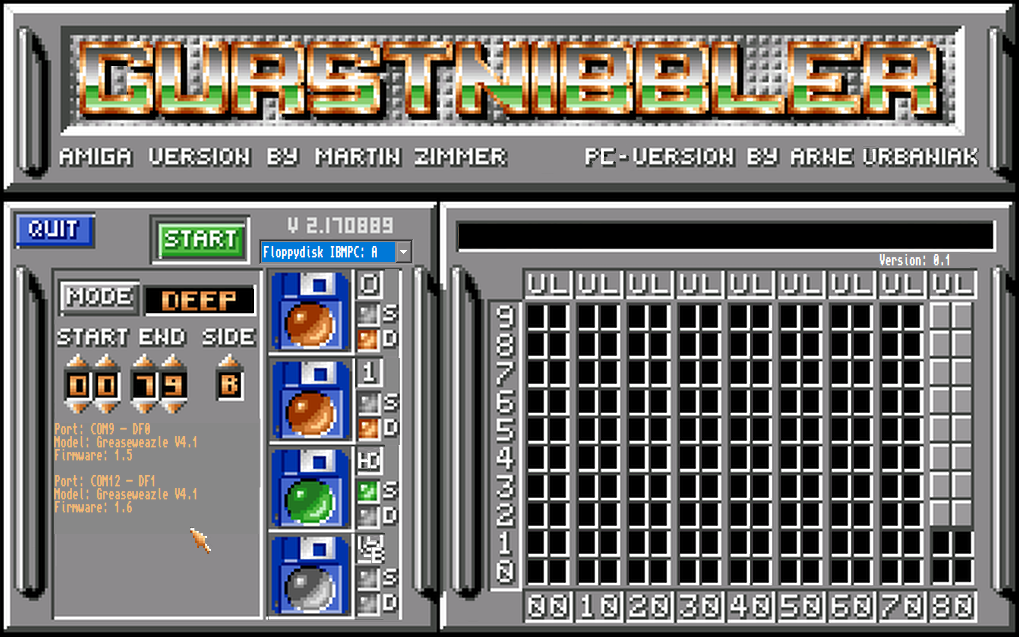
GURSTNIBBLER
|
Working functions are:
Greaseweazle and ADF-Drive:
DOS -> ADF file>floppy disk and floppy disk>ADF file,
BAM -> ADF file>floppy disk and floppy disk>ADF file (only data from bitmap; much faster),
DEEP -> SCP file>Diskette and floppy disk>SCP file (incl. copy protection),
- Sorry but writing SCP to Disk is not supported by ADF-Drive,
DMS2Disk -> DMS file>floppy disk,
DMS2ADF -> DMS file>ADF file
IPF2Disk -> IPF file>floppy disk,
QFRMT -> quick formatting the disk writing X-Copy-Bootblock and a bitmap,
ERASE -> erasing the disk,
Selection of the floppy disk drive:
- IBM A or B
- Shugart 0 or 1 or 2
Copy IPF-file -> floppy disk...
- SORRY but writing SCP to Disk is NOT SUPPORTED by ADF-Drive Controller
Until now you can copy whole disks.
If you use beginning-end (say track 10-20), only the data of these tracks will be copied. (file will be smaller than 880 kb).
You can write to multiple destinations
DrawBridge aka Arduino Amiga Floppy Disk Reader/Writer:
Detecting DrawBridge works...
Erasing disk works...
Reading/writing up to come...
Left click on PC-VERSION by Arne Urbaniak plays and stops music
Right click on PC-VERSION by Arne Urbaniak to select your own music
Note:
So far, copying with 2 Graeseweazle devices only works when both have twisted cables and the drive selection is set to IBMPC: A !
I don't know why yet.
I'm working on it.
Happy copying...
I would be glad about feedbacks and improvement suggestions from you.
Sometimes i can't see the forest for the trees.
Please send them to: aurbaniak@escomputing.de
Gurstnibbler-Manual (eng)
Gurstnibbler-Manual (ger)
But for Gurstnibbler you need at least one of this hardware:
Greaseweazle by Keir Fraser
Greaseweazle-Link
(Thanks to Keir for his great work)
ADF-Drive by D. Tonn
ADF-Drive-Link
(Thanks to Nick for his great work)
DrawBridge aka Arduino Amiga Floppy Disk Reader/Writer by Rob Smith
DrawBridge aka Arduino Amiga Floppy Disk Reader/Writer-Link
(Thanks to Rob for his great work)
Installation:
Extract the Zipfile into a folder of your choice and copy the TTF-Font into the Windows\fonts directory.
That's all...start Gurstnibbler.exe (Languages: german/english)
Download Gurstnibbler Ver 0.1